The Dock Flash That Led Me to a Malicious npm Package

Waleed Mumtaz
@waleedmumtaazPublished on
A project a potential client shared with me quietly added a clipboard hijacker to my machine. Here is how three small symptoms led me to a malicious npm package, and how I removed it.
Table of Contents
- Introduction
- Three Things That Felt Wrong
- Asking AI for Help
- Something Was Pretending to Be GNOME
- The Root Cause: A Three-Link Chain
- What It Was Actually Doing
- The Timeline
- The GitHub Advisory
- Where AI Helped, and Where It Didn’t
- How I Removed It
- Conclusion
Introduction
Not long ago, my laptop started doing three small things. Any one of them on its own would have been easy to ignore. Together, they meant something was running on my machine that I had not installed on purpose.
Disclosure: I am a frontend developer, not a security researcher. I could not have worked this out on my own. OpenCode, running DeepSeek V4.1 Flash, helped me at every step: reading the process list, connecting it to the files on disk, matching timestamps, checking the npm registry, and planning the removal in an order that actually worked. I verified each step on my own machine, and this article is my account of that process.
This is the story of how I found it, what it turned out to be, and how I removed it. If you only take one thing away from this article, let it be this: check the dependencies of a project before you run it. That single habit would have saved me this whole mess.
Three Things That Felt Wrong
The first sign had nothing to do with security. I was on YouTube, hovering over a video thumbnail, and the preview started playing, except it kept pausing and restarting. Not buffering. Not slow internet. The preview would play for a second, restart, play, restart, while my mouse never moved.
I opened a second browser. Same thing. That ruled out the browser.
Then I noticed the second thing: something flashing in the Ubuntu dock. An icon would appear and disappear before I could read it, every few seconds, like an application opening and closing in a loop.
And the third thing, the one that actually made me worry: while typing, a letter would occasionally vanish. Not lag where you see the character appear late. Just missing. As if the keystroke went somewhere else.
Individually, each of these has an innocent explanation. Together, they have one explanation, and it is not innocent.
Asking AI for Help
I asked an AI assistant what could cause all three symptoms. It told me to open htop and watch the process list.
If you have never used htop, the default view is not much help here. Processes come and go faster than you can read them. What worked for me was two changes in htop’s setup (press F2): I turned on Highlight new and old processes, and I sorted the list by PID instead of CPU. Sorting by PID keeps the order stable, so anything that opens and closes shows up as the same line blinking in and out, each new process highlighted as it appears.
Then I just watched for a minute. There it was: a line appearing and disappearing every second or two, highlighted each time it came back. Something was spawning it and killing it over and over. That immediately explained the dock flash: every spawn was an application window briefly registering with the desktop, and every kill removed it again.
So I had a process name. What I did not have was any idea what to do with it. I am a frontend developer; reading a process tree is not part of my day job.
That is when I asked OpenCode, running DeepSeek V4.1 Flash, to take a look.
Something Was Pretending to Be GNOME
The process looked ordinary at first glance. It was called gvfsd-network, which is a real GNOME daemon, the thing that handles network shares in your file manager. Except there were 28 of them.
And the real one lives in /usr/libexec. These were Node.js processes:
ps -eo pid,ppid,etime,pcpu,comm | grep gvfsdChecking what each process actually was:
readlink /proc/<PID>/exeEvery one of them pointed at the same Node.js binary in my home directory. The process names were fake. The process title had been overwritten to impersonate a system daemon.
Then we found its home base: a folder in ~/.config/ named after that same system component, where no such thing belongs.
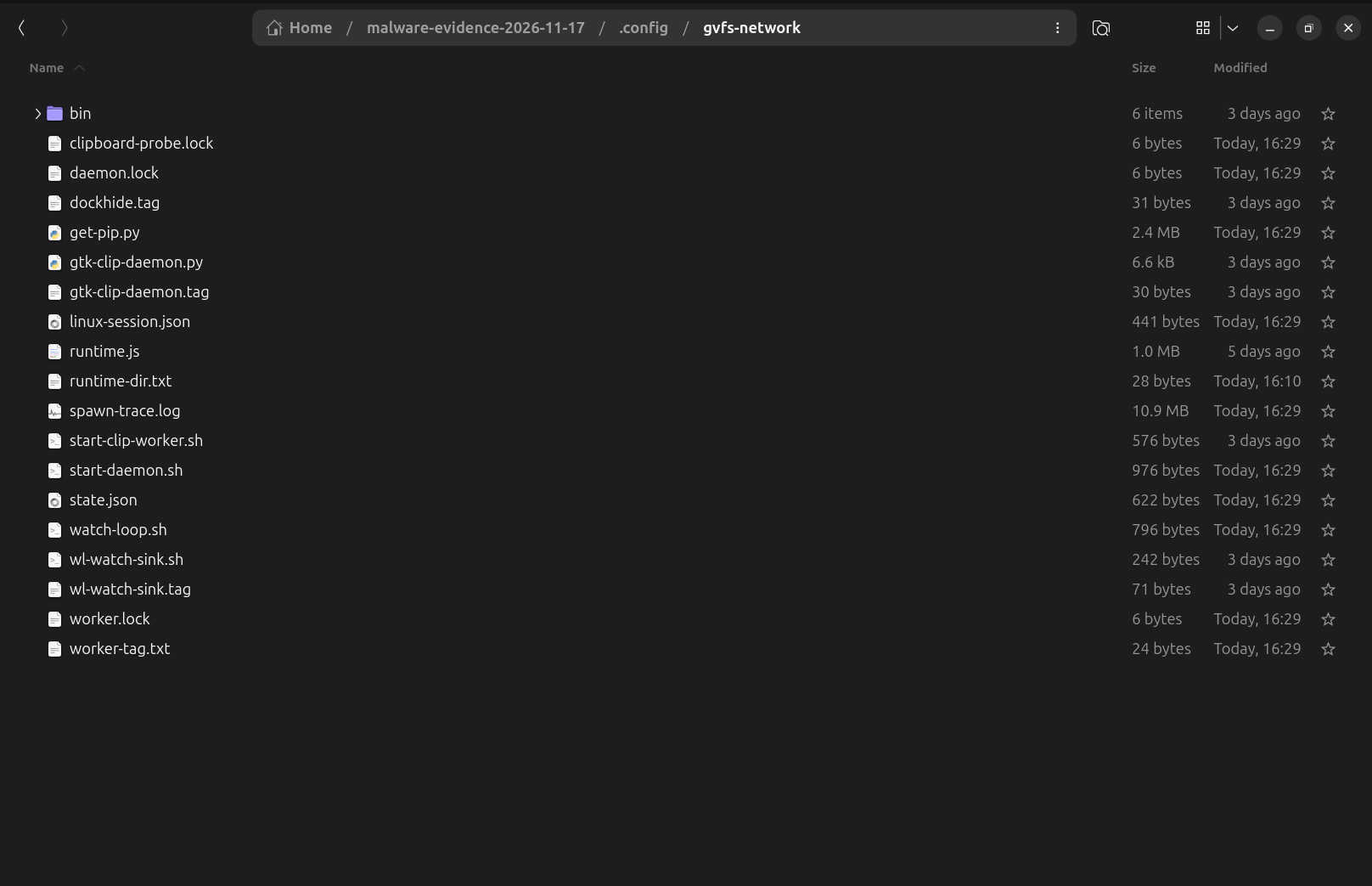
The contents were not a configuration either: shell scripts, Python files, lock files, a 10 MB spawn log, and a state.json. Two systemd user services pointed at those scripts, both described as “GNOME Virtual File System network agent” and “GNOME Virtual File System network monitor”, both enabled, both set to Restart=always.
That last part is the reason the loop never stopped:
kill the process   → systemd restarts the service
service restarts   → the watchdog spawns the process again
watchdog spawns    → and the cycle repeats
If you just kill the process, it comes back. If you kill the watchdog, the service restarts it. You have to remove the supervisor before you remove the thing it supervises.
But none of that told me where the thing came from. That was the next question, and the answer was sitting in the process itself: its working directory was not a system directory. It was inside a project folder on my machine, in a node_modules directory. That was the thread that led back to the project.
The Root Cause: A Three-Link Chain
I had not installed anything unusual, or so I thought. The project came from a potential client I was talking to on a freelance platform. He said there were some problems with it and asked whether I could help him fix it, then shared the project files.
Nothing had been paid, and the work had not started on the platform yet. This was still the conversation stage, the part where you look at what someone has and decide whether you can help. I installed the project and ran it locally to see what was wrong.
That is the part that still bothers me. The riskiest thing I did that week was not a command I typed. It was running someone else’s project to be helpful.
The next day, when I went back to the conversation, his account was no longer accessible. The platform had blocked him, so I never got the chance to ask him anything about the code.
Note: I do not know whether the person who shared this project knew what was inside it, and I am not accusing him of anything. This article is not about him. It is about what the code did and how I found it. It is entirely possible he downloaded the same project from somewhere else and never opened its node_modules folder.
The chain was three links deep:
frontend/package.json
  └── tailwind-motion-css@1.0.5
        └── @codentra/postcss-kinetix@1.0.5
              └── src/config.js   ← the payload
The project used a Tailwind plugin. That plugin depended on a PostCSS helper. That helper contained a config.js file that was 159 KB of obfuscated JavaScript, bundled with // @bun at the top. It looked nothing like a configuration file.
Here is the part every frontend developer should take away from this article:
tailwind.config.js is executable JavaScript. A Tailwind plugin is loaded with require(), and require() runs code. My tailwind.config.js contained this:
plugins: [
	require('tailwind-motion-css')({
		duration: '500ms',
		delay: '1s',
		iterationCount: '2'
	})
]
That require is what executed the payload. Not npm install. npm run dev. It needed nothing more than the dev server compiling my CSS.
The other detail that matters: those packages had been published a few days before I installed them, and they were taken down within hours of my install. The window during which this package was live was only a few days wide. I walked straight into it.
Note: both packages are now replaced on the npm registry by 0.0.1-security placeholders. That is npm’s standard tombstone for packages that were removed for security reasons. If you ever see that version on a package, do not install it.
What It Was Actually Doing
The payload was a crypto clipboard hijacker, specifically a wallet address swapper. It watches your clipboard, detects when you copy something that looks like a wallet address, and replaces it with an address from a list hidden inside its own encrypted strings.
It did not try very hard to hide what it was, once the code was unwrapped. Some of its function names were still readable inside the obfuscation:
clipboardTextIsSingleWalletextractSingleWalletLinedetectWalletChainKindshouldSwapWalletNowreplacementForLine
It also checked where you were pasting. Using Linux accessibility APIs, it looked at whether a wallet interface or a browser sidebar had focus, and it deliberately skipped the swap when you had copied a terminal command or a package manager line. It wanted to be invisible in exactly the places where someone would notice.
And it had a dormancy period. A small state.json file recorded an activation time 48 hours after its first run, with a 12-hour “normalcy” window before that. Malware does this so that anyone testing it in a sandbox sees nothing for a day or two, and so that a person who ran a project once and moved on has already forgotten about it by the time it wakes up. The delay applied to the swapping, not to the persistence, which was in place from the first run.
The irony in my case: I do not use crypto and I do not have any wallets. The main purpose of that payload had no target on my machine. But everything around it (the persistence, the monitoring, the focus detection, the process spawning) kept running anyway.
The Timeline
This is the part that turned a guess into a conclusion. The timestamps lined up too well to be a coincidence:
| Date and time | Event |
|---|---|
| Nov 12, 15:25 | npm install fetches the malicious package |
| Nov 12, 15:27 | node_modules written to disk |
| Nov 12, 16:10 | Next.js build. Tailwind loads the plugin |
| Nov 12, 16:11:28 | Payload first run, recorded in its own state.json |
| Nov 13 | The platform blocks the client’s account |
| Nov 14, 16:57:58 | Payload activates, exactly 48 hours later |
| Nov 17 | I notice the symptoms and start investigating |
The payload recorded its own first run and activation times. It was keeping the same calendar I was.
The GitHub Advisory
This is not just my machine’s story. GitHub published a malware advisory for the exact package I installed: GHSA-3c2h-hxp8-jr9c: Malware in tailwind-motion-css.
It lists every version as affected, no patched version, and the weakness as CWE-506: Embedded Malicious Code. The advisory’s description is blunt, and worth reading in full:
Any computer that has this package installed or running should be considered fully compromised. All secrets and keys stored on that computer should be rotated immediately from a different computer.
That is the conservative position, and it is the right one. In my case, the malicious code ran with my user privileges and I found no evidence that it had escalated to system level: there were no root services, no cron jobs, no changes to system shell startup files. But I still rotated my credentials, from another device, because “I found no evidence” is not the same sentence as “nothing happened.”
Note: finding a GHSA advisory for a package in your lockfile is a strong signal, but the absence of one does not mean a package is safe. Advisories only cover packages somebody has already reported.
Where AI Helped, and Where It Didn’t
I want to be honest about this part, because it is the part I would want to read if I were you.
What it did well: reading the process tree, spotting the daemon impersonation, decoding the systemd units, correlating the install time with the activation time, checking the npm registry to confirm the package had been pulled, and, most importantly, sequencing the removal correctly. If I had simply killed the processes, they would have been back within thirty seconds. The order that worked was: stop the two services, kill the watchdog, then kill the processes, then verify.
What it got wrong: the first hypothesis was the curl | bash installers in my shell history. That was plausible, and it was wrong. The timestamps disproved it: the payload’s first run matched the Next.js build, not the installers. A good investigation does not just produce a theory; it finds the evidence that kills the wrong ones.
What it could not do: rotate my passwords, decide whether to wipe the machine, or know what I had copied to my clipboard during those days. Those are judgement calls, and they were mine.
I did not solve this alone. I noticed the symptoms, I ran htop and found the loop, and I made the decisions. The AI turned a suspicious process name into a complete picture, and then into a removal plan that held. On my own, my most likely outcome would have been killing processes for an hour and assuming it was fixed.
But I also verified what it told me. Every technical claim in this article was checked against the actual machine: the processes, the files, the registry, the timestamps. AI can be confidently wrong, and you are the last line of review. That is true for malware, and it is true for code.
How I Removed It
At a high level, because the exact commands are not the interesting part:
- Stopped the supervisors: both systemd user services, disabled and stopped.
- Killed the watchdog loop, so nothing could respawn.
- Killed the fake
gvfsd-networkprocesses, filtered by their real executable path, so the genuine GNOME daemon was not touched. - Removed the persistence: the unit files, the enablement symlinks, and some decoy
.desktopentries. - Removed the payload: its config directory and its runtime directory.
- Deleted the dropper: the project’s
node_modules, its build output, the project itself, and the npm cache entries, so that a futurenpm cicould not reinstall it from cache. - Rebooted and verified: no services, no processes, no directories, and no unexpected network connections.
After the reboot, the dock flash and the dropped letters stopped immediately. That was the confirmation I needed.
Conclusion
Three small symptoms (a stuttering video preview, a flashing dock icon, a missing letter) turned out to be one program. It had arrived as a dependency of a project a potential client shared with me, and it had quietly waited 48 hours before doing anything at all.
I got lucky in an unusual way: the payload wanted crypto wallets, and I do not have any. But the persistence, the monitoring, and the drain on my machine were real whether or not it found what it was looking for.
The part I keep thinking about is that the thing was loud. It spawned processes every second. It showed up in htop. It wrote its own schedule to a JSON file. It was not sophisticated. It was just confident that nobody would look.
It is also the first time I have been genuinely glad to have an AI assistant on my side. I could see that something was wrong, but I could not have told you what a fake gvfsd-network process was, why a systemd user service kept respawning it, or which of my installed packages had put it there. OpenCode did the part I could not do: it connected the process to the files, the files to the timestamps, and the timestamps to a package I had installed a few days earlier. It also stopped me from making the obvious mistake of killing processes that would have come straight back.
If you are not a security person, that is the strongest argument I can give for keeping one of these tools nearby when something feels off. You still have to verify what it tells you, and you still have to make the decisions. But the distance between “my laptop is acting strange” and “here is the exact package, and here is how to remove it” is not something I could have covered on my own. Without that help, I would probably still be watching a dock icon flash and assuming it was a graphics bug.
So look. 😀